Instructor perspectives on undergraduate class size in Canada
Invitation to participate
(Français à suivre)
I am inviting instructors at Canadian universities to participate in a short research survey about how instructors define undergraduate class size.
The purpose of this study is to better understand how instructors across Canada think about categories such as small, medium, and large class in direct-entry undergraduate programs.
The survey:
Is intended for individuals who currently teach undergraduate courses at a Canadian university
Please feel free to share this invitation with colleagues who meet the eligibility criteria.
This study has been reviewed and received ethics clearance from the Queen’s University General Research Ethics Board (GREB).
If you have any questions about the study, you may contact: Dr. Gavan Watson Associate Professor, Faculty of Education Queen’s University gavan.watson@queensu.ca
Thank you for considering participation.
Perceptions des personnes enseignantes quant à la taille des groupes au premier cycle au Canada
Invitation à participer
J’invite les personnes enseignantes des universités canadiennes à participer à un court sondage de recherche portant sur la définition de la taille des classes au premier cycle.
L’objectif de cette étude est de mieux comprendre comment les personnes enseignantes à travers le Canada conçoivent des catégories telles que petit classe, classes de taille moyenne et grand classe dans les programmes de premier cycle à admission directe.
Le sondage:
S’adresse aux personnes qui enseignent actuellement des cours de premier cycle dans une université canadienne
Prend environ 3 à 5 minutes à completer
Est volontaire et anonyme
Ne recueille aucun nom ni aucune information de contact
N’hésitez pas à transmettre cette invitation à des collègues qui répondent aux critères d’admissibilité.
Cette étude a été examinée et approuvée par le Comité d’éthique de la recherche générale (General Research Ethics Board – GREB) de Queen’s University.
Si vous avez des questions au sujet de l’étude, vous pouvez communiquer avec: Dr. Gavan Watson Associate Professor, Faculty of Education Queen’s University gavan.watson@queensu.ca
Dr. Natasha Kenny (University of Calgary) and I have collaborated on two posts focused on the planning, design and use of active learning classrooms. The development of these kind of learning spaces are a relatively recent development in Canadian Higher Education, with a majority of these classrooms renovated or built within the last ten years. In this first post, Natasha and I survey the literature describing just what we know about active learning classrooms and their reported impact on classroom teaching and student learning.
What are Active Learning Classrooms?
Most simplistically, active learning classrooms (ALC) are on-campus learning spaces intentionally designed to allow for the facilitation by instructors of a variety of active learning strategies.
While most research on the effects of active learning has occurred in the context of the Science, Technology, Engineering and Mathematics (STEM) disciplines, these classroom techniques have been shown to offer a variety of meaningful improvements in student learning (Freeman et al., 2014; Theobald et al., 2020; Weir et al., 2019). Here, we draw on recent work of Driessen et al. (2020) to offer a definition of active learning, as a “…interactive and engaging [learning] process for students” implemented through a variety of classroom techniques that can include “metacognition, discussion [and] group work” (p. 6). Active learning researchers also foreground that many of the approaches used are student-centred (Kember, 1997), with a focus on students being offered agency or choice in what and how they learn (O’Neill & McMahon, 2005); put another way, students engaged in active learning are active (co-) creators of knowledge, rather than passive consumers.
Connections between classrooms and learning
While outside the scope of this series of posts to provide a detailed overview of the literature on the relationship between classroom spaces and learning, work in this area is clear: spaces that support teaching and learning are not neutral. Not neutral in the sense that the design elements of classroom spaces can help or hinder the adoption of approaches to teaching. Monahan (2002) writes that classroom design communicates a hidden curriculum (the implicit messages about the kinds of learning possible in a space), with classroom spaces built along a continuum of discipline and autonomy. Built pedagogy — “the ability of space to define how one teaches” (Oblinger, 2006)—asks us to reconsider the neutrality of space, and instead think of how spaces combine with beliefs and practice to create place. Monahan (2002) further defines built pedagogy as the “architectural embodiments of our educational philosophies” (p.5). Likewise, Ellis and Goodyear (2016) state that the “connections between place and learning can be subtle and powerful” (p. 150), and that space both communicates and influences “how knowledge is discovered, distilled and disseminated” (p. 165). Classrooms become places where implicit approaches to teaching and learning and the values underlying are made visible (for more on this, outside the context of ALCs but within the context of higher education, see Brown, 2019).
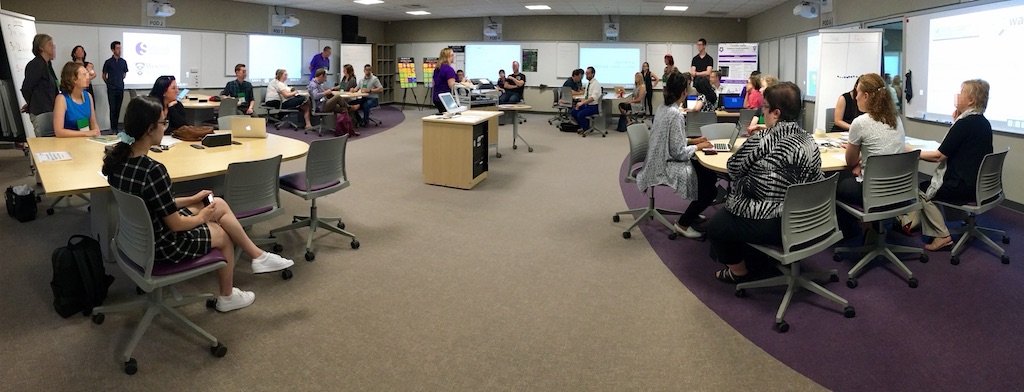
Figure 1: Panoramic photograph of an Active Learning Classroom at Western University (London, Canada).
In this regard then, ALCs are not only purpose-built spaces for the facilitation of active learning strategies, but through their design can allow students act as co-creators of knowledge, when those students are engaged in student-centred pedagogies.
Active learning classrooms versus traditional classrooms
ALCs are often described in opposition to so-called “traditional classrooms,” the learning spaces more typically found across higher education campuses. Traditional classrooms have been defined by their fixity: shared characteristics of fixed seating, arranged in rows, with an instructor located at the front of the classroom, often found behind a podium. Built, pedagogically speaking, for the direct transmission of knowledge through techniques like lecturing, researchers have noted that despite this fixed nature, active learning can still be facilitated in these traditional classrooms (Lasry et al., 2014); it is just that active learning is often adjunct to the underlying assumptions around what teaching and learning looks like.
Traditional classrooms have been defined by their fixity…built, pedagogically speaking, for the direct transmission of knowledge through techniques like lecturing.
ALC’s received increased attention in higher education research in the late 2000’s and early 2010s (Brooks, 2012; Walker et al., 2011; Whiteside et al., 2010a), and since then so-called active learning classrooms (of various designs) have been introduced to Universities and Colleges across the United States and Canada.
How active learning classrooms differ
So then, what makes ALCs different from traditional classrooms? Three US-based classroom projects appear to set an initial direction for the design of ALC spaces (Hyun et al., 2017): the University of Minnesota’s Active Learning Classrooms (Whiteside et al., 2010b), MIT’s Technology-Enabled Active Learning, or TEAL classrooms (Dori & Belcher, 2005), and classrooms designed for North Carolina State’s Student-Centred Active Learning Environment for Undergraduate Programs (or SCALE-UP) (Gaffney et al., 2008). Interactivity and technology, in opposition to fixity, underpin these designs, and publications on the outcomes fostered by learning in these classrooms share results of projects undertaken to improve the quality of learning focused on enhancing interaction through the configuration of learning spaces.
Finkelstein et al., (2016) and Finkelstein and Winer (2020) have also described and researched active learning classrooms within the Canadian context highlighting practical features of these spaces centred the following principles: academic challenge, learning with peers, experiences with faculty, campus environment and high-impact practices. These principles are directly connected to themes communicated and assessed through the National Survey for Student Engagement (NSSE). The authors summarize that learning spaces should:
allow students to actively engage with content and include a range of technologies that support multiple modes of teaching and learning.
provide features that permit students to work both individually and in collaboration with one another.
facilitate communication and interaction between students and faculty.
be consistent with the university’s culture and priorities as reflected in the campus master plan, follow university design standards, and be designed with future flexibility in mind.
exist within a larger a larger campus context; there should be an ease of transition between spaces so as to better support high-impact practice inside and outside the classroom (Finkelstein et al., 2016, p. 29).
Hallmarks of design
Interactivity, between classroom peers, between students and course material and between the instructor and students, is a focus of ALCs. Now, over ten years after the initial development of these classrooms, hallmarks of ALCs’ designs include:
students sitting in small groups, arranged at tables, with learners facing each other;
a lack of a “front” of the room, achieved in part by:
the lack of a fixed podium;
multiple screens and / or monitors; and
whiteboards or writable walls situated around the room, easily accessible to all learners; and
flexible furniture arrangements, most notably achieved through wheels on chairs, and when possible, wheels on tables.
Interactivity, between classroom peers, between students and course material and between the instructor and students, is a focus of Active Learning Classrooms.
Technology, when included in these spaces, affords students enhanced capacity to work together by facilitating the ease of information sharing (Stalp & Hill, 2019), such as through the sharing of student work via the multiple classroom monitors. Less visible, consideration is also given to acoustics, lighting and air quality (Finkelstein & Winer, 2020) in the design of these rooms.
Figure 2: Floor plan of an active learning classroom at Western University (London, Canada), illustrating design principles of an active learning classroom.
While technology plays a role in supporting the instructional efforts in these spaces, it has also been shown that in some cases ALCs do not significantly build students’ technological skills (Stalp & Hill, 2019). Research, however, suggests that within the limits of the respective projects, that ALCs exert “an independent and positive effect on student learning” (Brooks, 2012), and when compared with learning in traditional classroom, student self-rated satisfaction with learning increased, with students more satisfied with group work processes (Hyun et al., 2017). Peer connections developed in ALCs are perceived as meaningful and important (Stalp & Hill, 2019), where students and instructors develop a so-called “educational alliance” through the reduction of psychological distance between individuals in the class seemingly afforded by the classroom design (Baepler & Walker, 2014).
Importantly, however, other findings suggest that it is the facilitation of active learning that has a significant impact on student learning, independent of classroom design itself (Lasry et al., 2014). This suggests that if an instructor can successfully facilitate active learning in a traditional classroom, student outcomes will improve. What seems to change in ALCs, importantly, is the perception on the part of instructors that facilitating active learning is easier in these purpose-built spaces (Holec & Marynowski, 2020). This is supported by classroom observations in ALCs, where “classroom discussion and use of the board occurred more frequently in the ALC while the instructor moved about the room and consulted with students more in the ALC space.” (Brooks, 2012).
What have we learned about active learning classrooms?
We have learned, most fundamentally, that active learning classrooms support student-centred approaches to learning (Holec and Marynowski, 2020; Karipponaon et al, 2018; Eliis and Goodyear, 2016). What has also become clear is that we must see these spaces as a critical component of our teaching and learning community. Classrooms can be viewed as one of the most important artifacts that communicate the teaching and learning approaches that are most valued within our institutions: they represent an institution’s philosophy of teaching and learning. Holec and Marynowski (2020) identify that we can no longer see our learning environments as separate from our pedagogy. In short, we have learned that the planning, design, and use of learning spaces must be seen as a critical component of our institutional teaching and learning cultures, communities and practices.
Classrooms can be viewed as one of the most important artifacts that communicate the teaching and learning approaches that are most valued within our institutions: they represent an institution’s philosophy of teaching and learning.
Given what we have learned about ALCs, how then do we move forward to make the connection between space and learning more broadly visible within the context of our academic communities? We explore these questions in our second post on the topic.
References
Baepler, P., & Walker, J. D. (2014). Active Learning Classrooms and Educational Alliances: Changing Relationships to Improve Learning. New Directions for Teaching and Learning, 137, 27–40. https://doi.org/10.1002/tl.20083
Brooks, D. C. (2012). Space and Consequences: The Impact of Different Formal Learning Spaces on Instructor and Student Behavior. Journal of Learning Spaces, 1(2). https://libjournal.uncg.edu/jls/article/view/285
Brown, K. (2019). Creating Culturally Safe Learning Spaces and Indigenizing Higher Education. Journal of Learning Spaces, 8(2), 57–65. http://libjournal.uncg.edu/jls/article/view/1826/1367
Dori, Y. J., & Belcher, J. (2005). How Does Technology-Enabled Active Learning Affect Undergraduate Students Understanding of Electromagnetism Concepts? The Journal of the Learning Sciences, 14(2), 243–279. https://www.jstor.org/stable/25473479
Driessen, E. P., Knight, J. K., Smith, M. K., & Ballen, C. J. (2020). Demystifying the Meaning of Active Learning in Postsecondary Biology Education. CBE—Life Sciences Education, 19(4), ar52. https://doi.org/10.1187/cbe.20-04-0068
Finkelstein, A., & Winer, L. (2020). Active learning anywhere: A principled-based approach to designing learning spaces. In S. Hoidn & M. Klemenčič (Eds.), The Routledge International Handbook of Student-Centered Learning and Teaching in Higher Education (pp. 327–344). https://doi.org/10.4324/9780429259371-24
Freeman, S., Eddy, S. L., McDonough, M., Smith, M. K., Okoroafor, N., Jordt, H., & Wenderoth, M. P. (2014). Active learning increases student performance in science, engineering, and mathematics. Proceedings of the National Academy of Sciences, 111(23), 8410–8415. https://doi.org/10.1073/pnas.1319030111
Gaffney, Richards, E., Kustusch, E., Ding, M. B., & Beichner, L. (2008). Scaling Up Education Reform. Journal of College Science Teaching, 37(5), 48–53.
Holec, V., & Marynowski, R. (2020). Does it Matter Where You Teach? Insights from a Quasi-Experimental Study on Student Engagement in an Active Learning Classroom. Teaching & Learning Inquiry, 8(2), 140–164. https://doi.org/10.20343/teachlearninqu.8.2.10
Hyun, J., Ediger, R., & Lee, D. (2017). Students’ Satisfaction on Their Learning Process in Active Learning and Traditional Classrooms. International Journal of Teaching and Learning in Higher Education, 29(1), 108–118.
Kember, D. (1997). A reconceptualization of the research into University Academics’ conceptions of teaching. Learning and Instruction, 7(3), 255–275. https://doi.org/10.1016/s0959-4752(96)00028-x
Lasry, N., Charles, E., & Whittaker, C. (2014). When teacher-centered instructors are assigned to student-centered classrooms. Physical Review Special Topics – Physics Education Research, 10(1), 010116–010119. https://doi.org/10.1103/physrevstper.10.010116
Monahan, T. (2002). Flexible Space & Built Pedagogy: Emerging IT Embodiments. Inventio, 4(1), 1–19. Oblinger, D. (2006). Space as Change Agent. In D. G. Oblinger (Ed.), Learning Spaces (pp. 1–4). EDUCAUSE.
O’Neill, G., & McMahon, T. (2005). Student-centred learning: What does it mean for students and lecturers? In G.
O’Neill, S. Moore, & B. McMullin (Eds.), Emerging issues in the practice of University Learning and Teaching (pp. 27–36).
Stalp, M. C., & Hill, S. E. (2019). The Expectations of Adulting: Developing Soft Skills through Active Learning Classrooms. Journal of Learning Spaces, 8(2), 25–40. http://libjournal.uncg.edu/jls/article/view/1753/1363
Theobald, E. J., Hill, M. J., Tran, E., Agrawal, S., Arroyo, E. N., Behling, S., Chambwe, N., Cintrón, D. L., Cooper, J. D., Dunster, G., Grummer, J. A., Hennessey, K., Hsiao, J., Iranon, N., Jones, L., Jordt, H., Keller, M., Lacey, M. E., Littlefield, C. E., … Freeman, S. (2020). Active learning narrows achievement gaps for underrepresented students in undergraduate science, technology, engineering, and math. Proceedings of the National Academy of Sciences, 201916903. https://doi.org/10.1073/pnas.1916903117
Walker, J. D., Brooks, D. C., & Baepler, P. (2011). Pedagogy and space: Empirical research on new learning environments. Educause Quarterly, 34(4). http://er.educause.edu/articles/2011/12/pedagogy-and-space-empirical-research-on-new-learning-environments
Weir, L. K., Barker, M. K., McDonnell, L. M., Schimpf, N. G., Rodela, T. M., & Schulte, P. M. (2019). Small changes, big gains: A curriculum-wide study of teaching practices and student learning in undergraduate biology. PloS One, 14(8), e0220900-16. https://doi.org/10.1371/journal.pone.0220900
Whiteside, A., Brooks, D. C., & Walker, J. D. (2010a). Making the case for space: Three years of empirical research on learning environments. Educause Quarterly, 2, 5–16. https://doi.org/10.4135/9781446214206.n1
Whiteside, A., Brooks, D. C., & Walker, J. D. (2010b). Making the Case for Space: Three Years of Empirical Research on Learning Environments. Educause Quarterly, 33(3), 11.
Here’s a bit of a natural history mystery that I found yesterday: this green flower in a bed of White Trilliums (Trillium grandiflorum); something that I had never seen before.
The few initial web references I found suggested this is caused by a bacterium or a virus; further detective work unearthed a 46-year old paper (Hooper, Case & Myers, 1971) that suggests this greening is caused by “mycoplasma organisms”—a kind of bacteria and will cause the plant (eventually) to die.
It sounds like in the ensuing 40+ years since Hooper, Case & Myers published their (3 page!) paper, these “mycoplasma organisms” pathogens have come to be called phytoplasma—see Bertaccini et al., (1999), a paper that references Hooper, Case & Myers (1971).
And with that little discovery, a new world opens: a 2016 paper by Arocha-Rosete et al. that links the disease to a specific strain of phytoplasm: Candidatus Phytoplasma pruni, closely related (like 99% similar) to a phytoplasm called Milkweed yellows phytoplasma.
So…mystery solved?
Because I’m a geek, here’s the reference to the 1971 article: Hooper, G. R., Case, F. W. and Myers, R. 1971. Mycoplasma-like bodies associated with a flower greening disorder of a wild flower, Trillium grandflorium. Plant Disease Reporter, 55: 1108–1110.
Here are the rest of the references I unearthed:
Bertaccini, A., Fránová, J., Paltrinieri, S. et al. European Journal of Plant Pathology (1999) 105: 487. doi:10.1023/A:1008745206438
Arocha-Rosete Y, Morales-Lizcano NP, Hasan A, Yoshioka K, Moeder W, Michelutti R, Satta E, Bertaccini A, Scott J (2016) First report of the identification of a ‘Candidatus Phytoplasma pruni’-related strain in Trillium species in Canada. New Disease Reports 34, 19. doi: 10.5197/j.2044-0588.2016.034.019
Prideax’s (2003) description of three levels (the planned, the delivered, and the experienced) for examining curriculum is helpful for thinking about what kind of questions get asked about curricula. With a focus on the delivered curriculum, faculty members engage in curriculum mapping to see, over the course of a program, what gets taught, when it gets taught and how it gets assessed. The mapping described below occupies Prideax’s “delivered curriculum” level with faculty members’ experiences in their individual classrooms a key component of analysis.
Two key assumptions here: the data is meant to be examined in aggregate—that is, the unit of assessment is at the program level, not at the level individual courses ((This is largely an act of “bracketing” as individual courses can be seen in the data. The intent is not to use the data to say “Professor X is not doing Y in class Z”.)) ; and that the data does not drive decisions, rather the data drives discussions amongst faculty members which, in turn, drives decision making.
A challenge with curriculum mapping can be the logistics of it — done by hand and following a collaborative model, there are sticky notes to transport and transcribe, not mentioning the additional challenge of getting faculty members together in one room at one time.
At Western University we’re in the midst of developing a web-based curriculum visualization tool that will create a series of curriculum visualizations. In the meantime, we felt we could improve our analog process by taking a small step into the digital world. Enter: Google Sheets.
Before I go into any sort of detail on what we’ve done, I’m just going to go ahead and share an example map with dummy data entered ((And it should be noted that the template is licensed under the Creative Commons under the terms of the Creative Commons Attribution-NonCommercial-ShareAlike 4.0 International License)).
The data collected produces two visualizations: the first is a visualization of a progression of learning through the program (what we sometimes call and IRM chart, where I stands for Introduce, R stands for Reinforce and M stands for Master). The approach of asking instructor to weight the complexity of an outcomes was inspired, in part, by Veltri, Webb, Matveev & Zapatero (2011). The second asks instructors whether an outcome is taught and / or assessed in their course (what we’ll often call an T/A chart).
Sandwiched between these two visualizations is an opportunity for faculty to enter the assessment methods and instructional methods used to assess and teach the particular program-level learning outcome in their course.
What’s elegant about this stop-gap is the fact that as instructors enter data, they create the visualization. There is no additional transcription or translation — my colleague, Dr. Beth Hundey, and I set up the Google Sheet to automatically update the colour of the cell, for example, in the IRM chart. At a glance, there’s the opportunity to see how a particular program-level learning outcome progresses through a program curriculum. The data can become “useful” the moment that faculty are done entering data.
Less elegant is the interpretation of the assessment and instruction data. We provide a list of methods linked to numbers, asking instructors to enter the list numbers that match the methods used in the course. There isn’t, however, an easy way to visualize the data entered — it requires extra step(s) of downloading and manipulating the data in a program like Excel. It should be noted that Google has added an “Explore” option that interprets the data entered and creates automatic visualizations of the data. My cursory look at the graphs created doesn’t make me want to suggest that this will be a viable option for creating useful visualizations.
Regardless, as we work with programs undergoing curriculum review, our collaborative sheet allows for the quick collection and interpretation of data. There’s certainly some work that’s required to set the sheet up as well as introducing the task to individual instructors. A curriculum visualization process set up in Google Sheets can work in very specific situations to simplify the task of collecting curriculum data for both faculty members and curriculum developers.
References
Prideaux, D. (2003). ABC Of Learning And Teaching In Medicine: Curriculum Design. British Medical Journal, 326(7383), 268–270. Retrieved from http://www.jstor.org/stable/25453551.
Veltri, N. F., Webb, H. W., Matveev, A. G., & Zapatero, E. G. (2011). Curriculum mapping as a tool for continuous improvement of IS curriculum. Journal of Information Systems Education, 22(1), 31.
This morning, I’m doing a quick scoping of the teaching and learning resources related to using Podcasts as an assessment tool in the Higher Education classroom. The intended outcome of this environmental scan is to see what the evidence suggests as best practice for designing and facilitating Podcasting assignments. My sources are varied, from Blog posts to peer-reviewed journals (see the bottom of the post for relevant links to the literature).
Initial reactions
Generally speaking, the literature describes students as reacting positively to Podcasting as an assignment type in their course.
Curiously, much of the peer-reviewed literature around Podcasts seems to “peak” at the end of the oughts. Google’s trend data using the search term “Podcast” appears to support this: an explosion of searches for Podcasts, which reaches its relative peak in 2006 ((Curiously, there’s another peak in December 2014 which Google attributes to the Serial Podcast)). If this is the height of the Podcast hype, then it’s not surprising to see papers start to appear in the closing years of the 2000s reporting on the use of Podcasts in the higher ed classroom. But Podcasts, as an assessment type, seems to have moved along the educational technology “hype cycle“.
Rather than work that describes the use of Podcasts as a kind of assessment, I’ve noticed more research on the use of Podcasts as:
a kind of instructional technology (e.g. recording lectures as making them available as Podcasts) and
a way to provide student feedback.
Can’t help but think there’s an opportunity here for some kind of introspective and retrospective look at eLearning, using Podcasting as a case study.
Design & facilitation considerations
So, without further ado, here’s what people have said about creating Podcast assignments:
Design
It will take students more time to produce their Podcasts than you initially imagine.
Limiting the length of the Podcast can limit the scope of production and, subsequently, time.
Consider if it is a group assignment or an individual assignment: if creating Podcasts for the first time, students want to be able to troubleshoot tech issues with peers rather than feeling it’s up to them to solve their problems.
To help tackle the scope of the project, and help with the technical side of things, consider scaffolding Podcasting assignment: break down the Podcast production into discrete steps and have students submit these along the way, in addition to the final version of the Podcast.
Is the Podcast a means to an end or an end itself: are you assessing the quality of production or the quality of ideas?
Consider providing explicit direction on the amount of time student should spend on post-production.
Reflect this in the assignment rubric.
Podcasting as a skill
Don’t assume that the “digital natives” in your class know what tools to use to create Podcasts, or, how to use the tools: Podcasting is a skill and they need to be taught that skill.
Having exemplars of other students’ Podcasts can help student grasp the expectations and scope of the assignment; or, create an example yourself.
One suggestion is to consider creating a Podcast as a live demo in-class: it can set students at ease and can demystify the production process.
Make use of your campus’ technology resources when introducing the assignment; having the appropriate campus support introduce the tools and how to use them is a great first step but…
Be prepared to devote class time to addressing on-going technical issues.
Don’t assume that there is sufficient campus resources to offer individualized support for each group or individual in your class.
Keep the tools inexpensive and simple: Garageband (OSX & iOS, $5) or Audacity (Windows, Linux, OSX, Free) should suffice for production.
Who is the audience for the Podcast? Have a clear notion of who the intended audience is and be able to communicate that to students.
A successful use of Podcasts in the classroom had other students as the audience: the Podcasts were used as a way to teach course material to their peers.
Dog Day Cicada Hatching, licensed for use under the creative commons.
I’ve only just noticed a change since our move 100 kilometres south-west from Guelph to London: there’s a different Cicada that makes up the summer-time chorus.
I’m very used to the song of the Dog-Day Cicada (Tibicen canicularis): it’s song has made up the entirety of my summer aural landscape in Southern Ontario. Now that male Cicadas have started to call (I heard my first Cicada calling on July 11th this year), I’m not just hearing the constant sound that characterizes the Dog-Day’s call. Rather, I’m hearing a loud, buzzy, pulsating call. After a little work, I think I’m hearing male Scissor-grinder Cicadas (Tibicen pruinosa). Neat thing is this species is not common in Guelph, but certainly common enough here in London. Looking at a range map, they’re shown to be in Michigan near the Canadian border, but not shown to be in SW Ontario. Perhaps individuals are slowly moving North due to climate change?
In this earlier post, I outline why Notability is my preferred app for taking hand-written notes on my iPad.
In concert with my handwritten notes, I’ve developed a paperless workflow that I use to automatically ((Well, as close to automatic as you can get–this process still requires opening Evernote in order to suck up the Notability notes)) import my Notability notes into Evernote.
I do this for a few reasons: the first is I use Evernote as my central repository for “keeping all my things” so it makes sense to be able to archive my notes in this way; secondly, as I am a premium Evernote user, the notes get OCR’d, so not only are they archived, but can appear as I search for items in Evernote ((It is worth noting that Evernote does a fairly poor job of OCR’ing my handwriting. In order to make the notes searchable, I always add a few keywords to the note using the typewriter tool in Notability or add a very descriptive title)).
So, based on this question from Jeff Aman, let me outline how I do this.
First, and perhaps the deal-breaker for some, you need to have a Windows install of Evernote. For some reason, only the Windows version has the “Import Folder” feature that I use to make this work.
This solution also requires linking Dropbox to your Notability app to automatically back-up your notes.
So, with your Dropbox account in hand and a Windows install of Evernote, here’s how to set things up.
1. First, in Notability, open up the app settings by selecting the gear in the lower right-hand side.
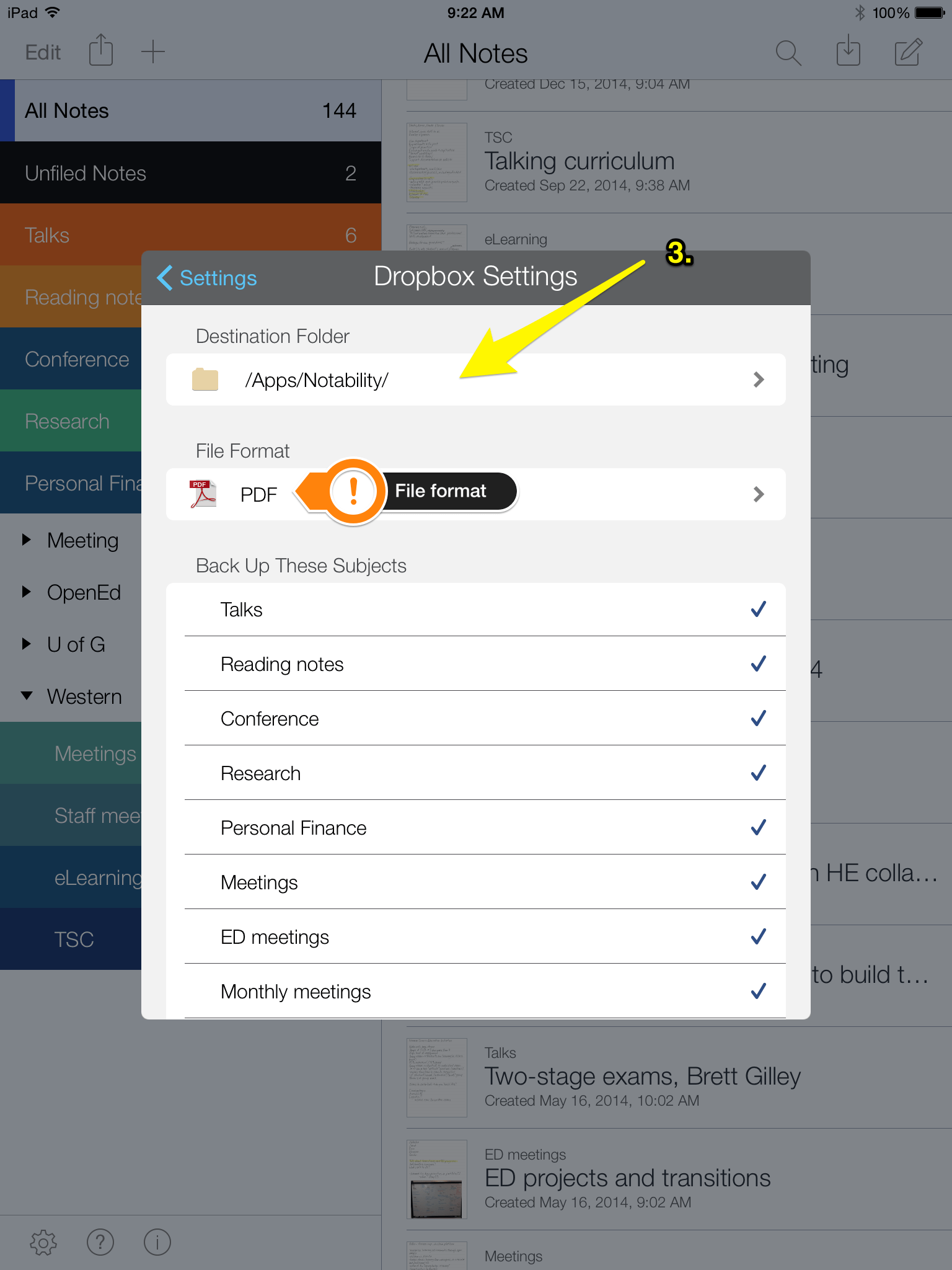
2. Now, selecting the “Auto-backup” option, ensure that Dropbox is linked to Notability (or go ahead and link it).
3. When you press the blue settings button to the right of the Dropbox setting (visible in the screen shot above), you are brought to Dropbox-specific configuration options. Notability notes need to be backed up into a separate, Notability-only Dropbox folder. Also you’ll want to ensure that the export file format is PDF.
At this point, you should be successfully backing your notes up to Dropbox. Now what remains is importing these files into Evernote.
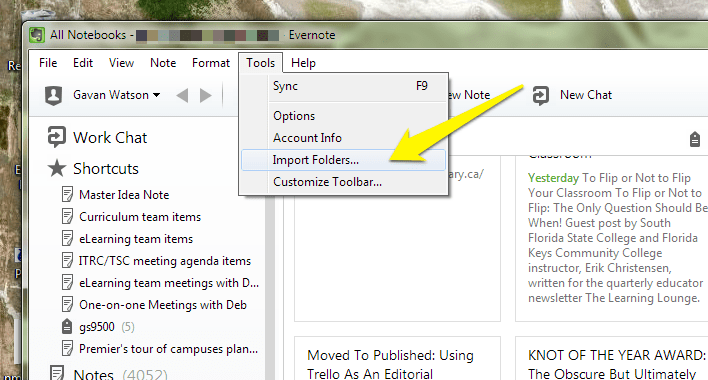
4. Opening up Evernote (in Windows), select the “Tools” drop-down menu. In that menu, you’re looking for the “Import Folders” option. Select it with a left-click.
5. A new dialogue box will appear with an “Add…” button. You’ll select this button and then navigate to the synced Dropbox folder containing your Notability PDFs. You’ll have the option of selecting what Notebook new notes are imported and if you want to keep or delete the PDF files once imported. FWIW, I keep the PDFs. Click OK!
With this step done, whenever you launch Evernote, it will monitor the Import folder. If a new PDF from a Notability note has been added to the Dropbox folder through the auto-backup process, it will be imported into Evernote.
Now, the process isn’t entirely perfect–while Evernote has never missed a PDF, duplicate versions of the same note appear at times. I suspect this has to do with how Evernote monitors for new files in the Import Folder and how Notability manages the Dropbox back-ups: there can be times where an “old” note gets a new date and Evernote treats it as a new file. While not great, I’d prefer two of the same file rather than missing a file completely.
Though not officially supported on OS X by Logitech, I followed these instructions and can confirm that the R800 works in OS X Yosemite with PowerPoint (for Mac 2011).
Heather and I are overjoyed to welcome a new “Whiteson” into the world: Colm Peter James Watson. Almost two weeks late, Colm was born at 9:48 pm on Monday, May 26th (after just 3 hours of active labour and 45 minutes of being admitted–way to go Heather) weighing in at 8 lbs. 10 oz.
We’re smitten all over again!
Heather is doing well (beyond the expected lack of sleep) and is enjoying bonding with Colm.
Lonán is an engaged big brother who happily showed Colm off to his preschool friends this morning.
Thanks to family and friends for their support before, during and after Colm’s birth. Special thanks to Iwona Kempa (who delivered Colm) and the gifted team in Pod A at Guelph Midwives who supported Heather and Colm during the pregnancy, delivery and throughout the first days of his life.
I’ve linked to the requisite solo infant shot, but there are (of course) more photos of him on-line (opens in new tab).
I’ll cut to the chase: I only use the iOS app Notability. I like it for a number of reasons. Most important for hand-writing notes (in my opinion) is the writing “zoom” feature, visible in the screen capture below in the bottom third of the screen:
Due to the imprecision of the stylus tip, it’s normally a pain to hand-write notes the same size as you would with a pen on paper (e.g. with the writing being the same size as a line on ruled paper). To do so with any precision means taking a long amount of time to write words. With zoom enabled, you’re able to write “big” in the zoom area and it appears “normal size” on the paper. This means you can write larger (as the stylus demands) and at the same speed as you would expect, but still capture smaller hand-written notes.
Yes, you could just choose to “write big” without using this zoom feature but the end product loses the impression of a pen or pencil writing on lined paper. Beyond aesthetics, it takes a whole bunch more pages to capture the same amount of text. When you’re in zoom mode and write into that green area, the “white box” visible on the normal sized paper auto-advances. In short, this means you can continue writing like normal in the zoomed-in area without having to manually advance the writing box. It makes it feel like you’re writing on a never-ending sheet of paper. This auto-advance isn’t unique to Notability, but they’ve implemented it best.
Alternative note-taking apps include GoodNotes or Penultimate. A quick note about Penultimate—its part of a suite of apps owned by Evernote, so if you’re interested in having access to your notes in Evernote, it’s probably the most straight-forward way to do that (but Notability PDFs can be automatically imported into Evernote with a little bit of work).
Some unique feature of Notability (versus the two apps mentioned above): you can record audio (helpful for lectures or conference talks) and have the audio synced to the notes you were taking at the time (meaning you can hear what the speaker was saying as you were writing a particular point); import images (e.g. photograph of a meeting whiteboard); and type notes (via on-screen keyboard). Not unique to Notability (but important features none the less) are: cloud syncing; automatic back-up to the cloud (i.e. Dropbox); and annotating PDFs.